MOYEO · WELCOME

Choose your language

언어를 선택해 주세요.
Suggested from your browser settings. You can change it anytime.

메뉴는 한국어·영어로 제공합니다. 장소·상품 정보는 선택한 언어의 등록된 번역을 표시하며, 없는 항목은 영어 또는 원문으로 표시합니다.
Menus are available in Korean and English. Place and product information uses your selected language where available, then English or the original text.

MOYEO KOREA / Incheon

Galaxy S Ultra Series Phone Rental at Incheon Airport

Incheon날짜·가격 확인 →

어디에 담을까요?

Galaxy S Ultra Series Phone Rental at Incheon Airport

만들어 둔 여행방

여행방 구성원과 공유되는 후보로 담습니다. 예약·일정 확정은 아닙니다.

여행방 만들기
취소 조건
무료 취소(이용 48시간 전까지)
예약 확정
몇 분 안에 확정
바우처
모바일 바우처를 제시해 주세요
PLAN YOUR EXPERIENCE

내 여행에 맞는 옵션 선택

패키지를 고르고 날짜와 수량을 선택하면 총금액을 확인할 수 있어요.

DISCOVER YOUR EXPERIENCE

미리 만나는 여행의 한 장면

Galaxy S Ultra Series Phone Rental at Incheon Airport

🔊 Please check after making your reservation

After completing your reservation, please check your email within 1-2 days and fill out and submit the Google Form.

Don't give up even if it's sold out!

Even if the reservations are fully booked, please contact us our CS center. Since cancellations occur frequently, we will notify you as soon as a reservation becomes available.

✈️ Airport pickup and return, as well as pickup and return at selected concert venues (advance inquiry required for venue service)
🛡️ Damage protection plan — worry-free coverage not offered by other services
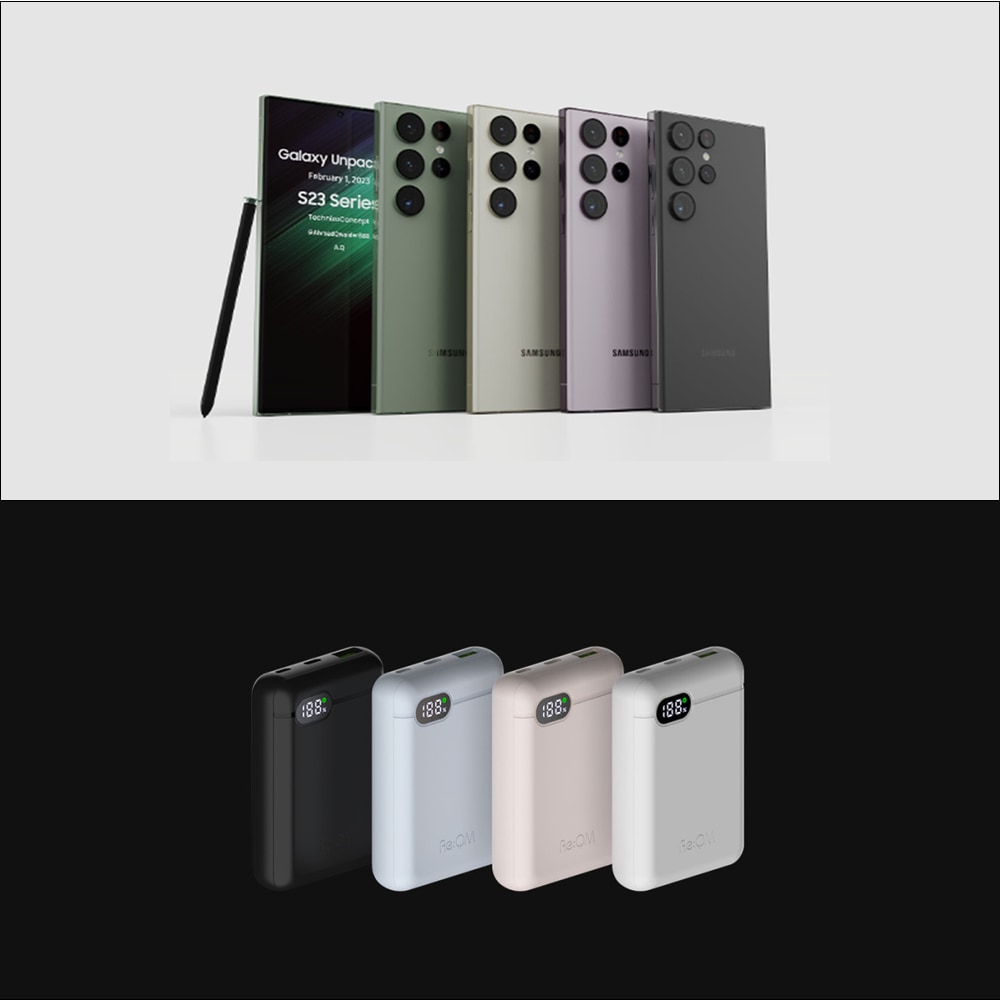
📱 Full lineup from Galaxy S23 to S26 — choose your preferred model
🤝 4 years of experience serving international customers — we take full responsibility for communication, pickup, return, and issue resolution
상품 소개 더 보기

A camera is needed on a special day or when you want to capture a great performance!

Since 2022, more concerts and venues have been banned from bringing in professional cameras.

This product is for fans who don't want to miss every expression of their favorite idols at concerts and fan meetings.

YOUR EXPERIENCE, IN DETAIL

패키지 이용 안내

위에서 옵션을 선택하면 해당 일정·포함 사항·이용 조건이 여기에 표시됩니다.

전체 패키지 조건 비교

Galaxy S25 Ultra Rental

취소 조건

무료 취소(이용 48시간 전까지)

포함 사항

공급사 영문 안내가 포함되어 있습니다.

The minimum rental period is 3 days. (If you pay for 3 days, you can also rent for 1-2 days.)
Galaxy S25 Ultra Device
Charger
Supplementary Battery
Camera proteced case

불포함 사항

공급사 영문 안내가 포함되어 있습니다.

Unable to support communication services such as USIM (Device Rental Only)

취소 조건

현지 시간 기준 이용일 48시간 전까지 취소하면 전액 환불됩니다
취소 정책에 관한 자세한 내용은 모여코리아에 문의해 주세요

사용 유효기간

바우처는 선택한 날짜(시간이 있는 경우 해당 시간)에만 유효합니다

예약 확정

몇 분 안에 예약이 확정됩니다. 확정 안내를 받지 못하면 모여코리아에 문의해 주세요

바우처

모바일 바우처를 제시해 주세요

집결·이용 장소

공급사 영문 안내가 포함되어 있습니다.

How to use

※ Rental services are not available for storage/pick-up or return outside of operating hours.
※ Customers using Incheon Airport T1 between 10:00 PM and 11:00 PM, please contact the CS channel for separate inquiries.
1. Select the desired rental start date and time.
2. Complete the reservation by entering the required information.
3. After completing your reservation, you must check the instruction email sent to you and fill out the Google Form. >>> Open instructions ↗
⚠️ If the Google Form is not completed after booking, your reservation may be canceled. Customers who do not submit the Google Form will be excluded from reservation priority, and their booking may be automatically canceled if stock becomes unavailable.
4. Please visit on time and follow the staff's guidance.
5. Please return the rental equipment according to the schedule you've purchased.
※ Rental period is based on date. e.g. If you want to start rental on the 1st of March and return to 5th of March, purchase 5 days (Not 24 hours based)

Rental Equipment Pickup Process

1. When you arrive at the meeting point, please send your information via the link below. Open instructions ↗
(During operating hours, staff will be stationed near the meeting point. Please wait a moment.)
2. Please inform the staff of the service you have reserved.
3. Rental items cannot be picked up or returned outside of operating hours.

Rental Equipment Return Process

1. Please check the rental package to ensure no items are missing.
2. If any items or components are missing, please contact us before returning the equipment.
3. When you arrive at the meeting point, please send your information via the link below.
4. Rental items cannot be picked up or returned outside of operating hours.

Notice

1. If the rental equipment is damaged/lost, please contact the CS center.
LINE ID : @558hovam (@ should be included)
kakao ID : forholiday
whatsapp: +82 10 7582 4470
For inquiries, please contact our CS center first.
2. If the equipment is not returned without prior contact, corresponding action will be taken.
3. To change the pickup time or the pickup terminal, you must contact CS center by 3PM(KST) the day before the pickup date.
4. Requests to change the pickup terminal or pickup time cannot be made on the day of pickup.
5. Pickup and return are available at both T1 and T2, and returns must be made during the operating hours.
6. The minimum rental period is 3 days. (If you pay for 3 days, you can also rent for 1-2 days.)
7. Operating hours : 5am - 10pm(T2) / 5am - 11pm(T1).
8. ※ Reservations are confirmed based on the order in which the Google Form is submitted. (Customers who do not complete the form will be excluded from reservation priority, and their booking may be automatically canceled if stock becomes unavailable.) Open instructions ↗
9. For customers who couldn't transfer their videos during the rental period or want to enjoy their schedule without worrying about data transfer, a data transfer service is available. Please follow the process below.
STEP 1. Contact CS Center after purchasing the product.
STEP 2. Send your English full name, rental schedule and request data transfer to the CS Center.
STEP 3. After returning the device, data will be uploaded to our cloud within 2 days, and a download link will be sent via your messenger.
STEP 4. You must download the data within 7 days after the link is received.
※ Data will be deleted after 7 days.
※ When returning the phone, the device will be reset the following day after collection, so any purchase or CS inquiries must be made on the same day the device is returned.
10. Damage Protection Plan (Optional)
A one-time fee applies regardless of the rental period.
Minor damage → You are responsible for 30% of the repair cost.
Irreparable damage → 100% of the retail price will be charged.
Loss and theft are not covered.
※ Can only be added up to 1 day before the pickup. Cannot be added after the rental period begins.

Lost, damaged will be charged

We do not charge for repairs in the case of Life scratches and general contamination.
In case of loss or irreparable damage to the product during rental, we charge 100% of the product sales price.
For transparency in billing, we are sending you the purchase receipt.

집결·이용 장소

공급사 영문 안내가 포함되어 있습니다.

Incheon Airport T1 : Meeting Point inside Exit 14 on the 3F
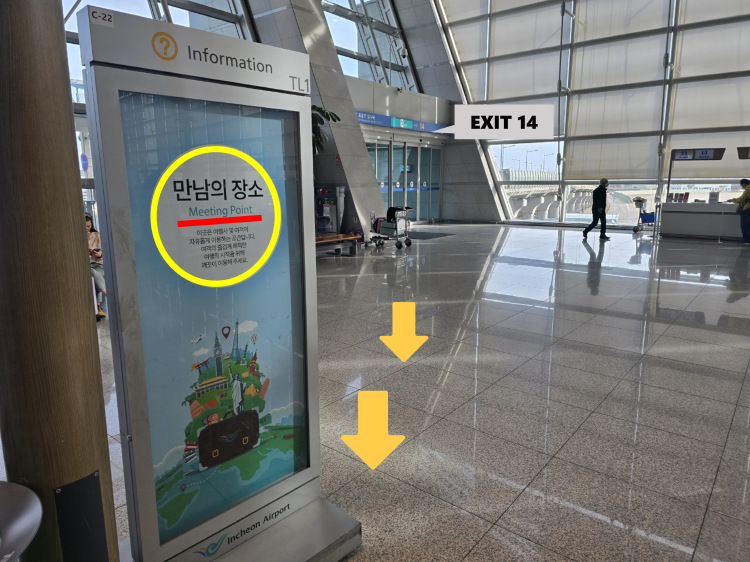
Incheon Airport T1 : Meeting Point inside Exit 14 on the 3F
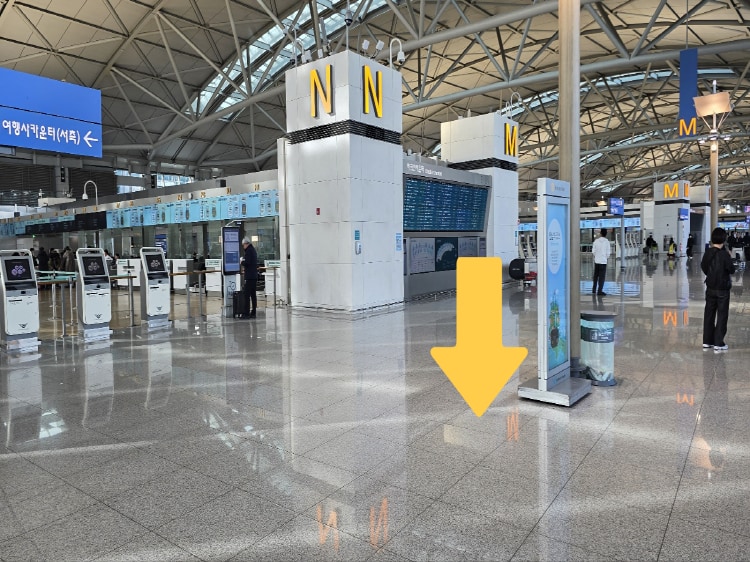
Incheon Airport T1 : Meeting Point inside Exit 14 on the 3F

Incheon Airport T1 : Meeting Point inside Exit 14 on the 3F

Incheon Airport T1 : Meeting Point inside Exit 14 on the 3F
Incheon Airport T2 : Inside Exit 8 on the 3F, Departure floor
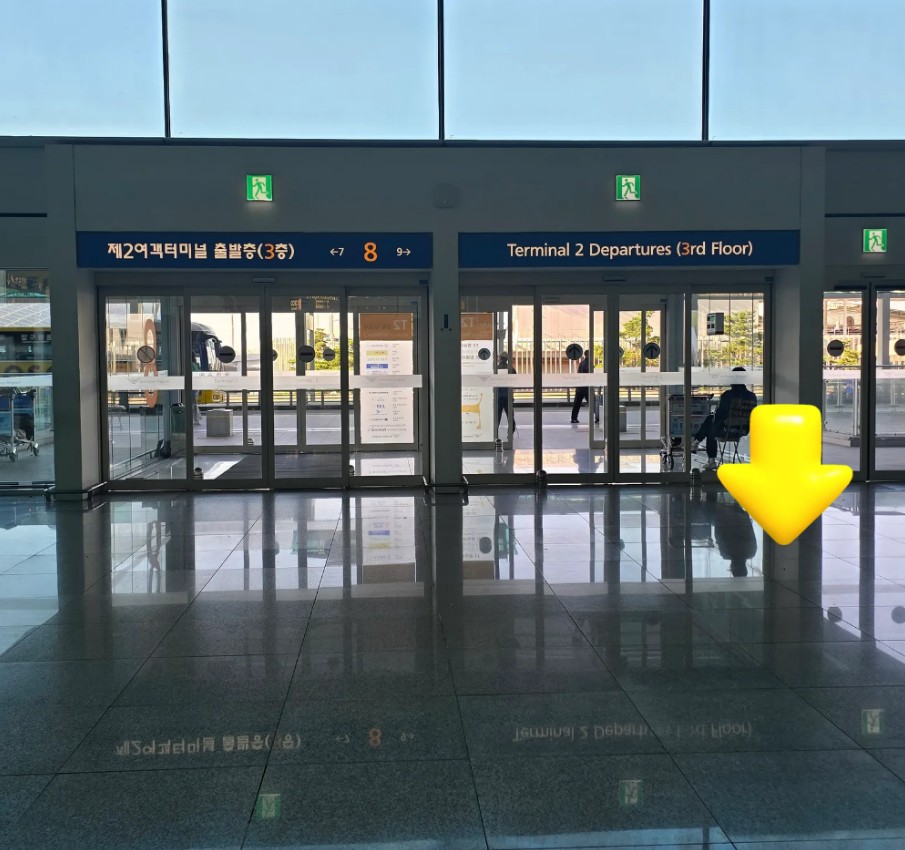
Incheon Airport T2 : Inside Exit 8 on the 3F, Departure floor

Incheon Airport T2 : Inside Exit 8 on the 3F, Departure floor

Galaxy S26 Ultra Rental

취소 조건

무료 취소(이용 48시간 전까지)

포함 사항

공급사 영문 안내가 포함되어 있습니다.

The minimum rental period is 3 days. (If you pay for 3 days, you can also rent for 1-2 days.)
[Reservation Information] Please choose the time to start the equipment rental at the airport.
Galaxy S26 Ultra Device
Charger
Supplementary Battery
Camera proteced case

불포함 사항

공급사 영문 안내가 포함되어 있습니다.

Unable to support communication services such as USIM (Device Rental Only)

취소 조건

현지 시간 기준 이용일 48시간 전까지 취소하면 전액 환불됩니다

사용 유효기간

바우처는 선택한 날짜(시간이 있는 경우 해당 시간)에만 유효합니다

예약 확정

몇 분 안에 예약이 확정됩니다. 확정 안내를 받지 못하면 모여코리아에 문의해 주세요

바우처

모바일 바우처를 제시해 주세요

집결·이용 장소

공급사 영문 안내가 포함되어 있습니다.

How to use

※ Rental services are not available for storage/pick-up or return outside of operating hours.
※ Customers using Incheon Airport T1 between 10:00 PM and 11:00 PM, please contact the CS channel for separate inquiries.
1. Select the desired rental start date and time.
2. Complete the reservation by entering the required information.
3. After completing your reservation, you must check the instruction email sent to you and fill out the Google Form. >>> Open instructions ↗
⚠️ If the Google Form is not completed after booking, your reservation may be canceled. Customers who do not submit the Google Form will be excluded from reservation priority, and their booking may be automatically canceled if stock becomes unavailable.
4. Please visit on time and follow the staff's guidance.
5. Please return the rental equipment according to the schedule you've purchased.
※ Rental period is based on date. e.g. If you want to start rental on the 1st of March and return to 5th of March, purchase 5 days (Not 24 hours based)

Rental Equipment Pickup Process

1. When you arrive at the meeting point, please send your information via the link below. Open instructions ↗
(During operating hours, staff will be stationed near the meeting point. Please wait a moment.)
2. Please inform the staff of the service you have reserved.
3. Rental items cannot be picked up or returned outside of operating hours.

Rental Equipment Return Process

1. Please check the rental package to ensure no items are missing.
2. If any items or components are missing, please contact us before returning the equipment.
3. When you arrive at the meeting point, please send your information via the link below.
4. Rental items cannot be picked up or returned outside of operating hours.

Notice

1. If the rental equipment is damaged/lost, please contact the CS center.
LINE ID : @558hovam (@ should be included)
kakao ID : forholiday
whatsapp: +82 10 7582 4470
For inquiries, please contact our CS center first.
2. If the equipment is not returned without prior contact, corresponding action will be taken.
3. To change the pickup time or the pickup terminal, you must contact CS center by 3PM(KST) the day before the pickup date.
4. Requests to change the pickup terminal or pickup time cannot be made on the day of pickup.
5. Pickup and return are available at both T1 and T2, and returns must be made during the operating hours.
6. The minimum rental period is 3 days. (If you pay for 3 days, you can also rent for 1-2 days.)
7. Operating hours : 5am - 10pm(T2) / 5am - 11pm(T1).
8. ※ Reservations are confirmed based on the order in which the Google Form is submitted. (Customers who do not complete the form will be excluded from reservation priority, and their booking may be automatically canceled if stock becomes unavailable.) Open instructions ↗
9. For customers who couldn't transfer their videos during the rental period or want to enjoy their schedule without worrying about data transfer, a data transfer service is available. Please follow the process below.
STEP 1. Contact CS Center after purchasing the product.
STEP 2. Send your English full name, rental schedule and request data transfer to the CS Center.
STEP 3. After returning the device, data will be uploaded to our cloud within 2 days, and a download link will be sent via your messenger.
STEP 4. You must download the data within 7 days after the link is received.
※ Data will be deleted after 7 days.
※ When returning the phone, the device will be reset the following day after collection, so any purchase or CS inquiries must be made on the same day the device is returned.
10. Damage Protection Plan (Optional)
A one-time fee applies regardless of the rental period.
Minor damage → You are responsible for 30% of the repair cost.
Irreparable damage → 100% of the retail price will be charged.
Loss and theft are not covered.
※ Can only be added up to 1 day before the pickup. Cannot be added after the rental period begins.

Lost, damaged will be charged

We do not charge for repairs in the case of Life scratches and general contamination.
In case of loss or irreparable damage to the product during rental, we charge 100% of the product sales price.
For transparency in billing, we are sending you the purchase receipt.

집결·이용 장소

공급사 영문 안내가 포함되어 있습니다.

Incheon Airport T1 : Meeting Point inside Exit 14 on the 3F

Incheon Airport T1 : Meeting Point inside Exit 14 on the 3F

Incheon Airport T1 : Meeting Point inside Exit 14 on the 3F

Incheon Airport T1 : Meeting Point inside Exit 14 on the 3F

Incheon Airport T1 : Meeting Point inside Exit 14 on the 3F
Incheon Airport T2 : Inside Exit 8 on the 3F, Departure floor

Incheon Airport T2 : Inside Exit 8 on the 3F, Departure floor

Incheon Airport T2 : Inside Exit 8 on the 3F, Departure floor

Data transfer service

취소 조건

무료 취소(이용 48시간 전까지)

포함 사항

공급사 영문 안내가 포함되어 있습니다.

Data transfer service - Available for one-time use

취소 조건

현지 시간 기준 이용일 48시간 전까지 취소하면 전액 환불됩니다

사용 유효기간

바우처는 선택한 날짜(시간이 있는 경우 해당 시간)에만 유효합니다

예약 확정

몇 분 안에 예약이 확정됩니다. 확정 안내를 받지 못하면 모여코리아에 문의해 주세요

바우처

모바일 바우처를 제시해 주세요

집결·이용 장소

공급사 영문 안내가 포함되어 있습니다.

How to use

※ Rental services are not available for storage/pick-up or return outside of operating hours.
※ Customers using Incheon Airport T1 between 10:00 PM and 11:00 PM, please contact the CS channel for separate inquiries.
1. Select the desired rental start date and time.
2. Complete the reservation by entering the required information.
3. After completing your reservation, you must check the instruction email sent to you and fill out the Google Form. >>> Open instructions ↗
⚠️ If the Google Form is not completed after booking, your reservation may be canceled. Customers who do not submit the Google Form will be excluded from reservation priority, and their booking may be automatically canceled if stock becomes unavailable.
4. Please visit on time and follow the staff's guidance.
5. Please return the rental equipment according to the schedule you've purchased.
※ Rental period is based on date. e.g. If you want to start rental on the 1st of March and return to 5th of March, purchase 5 days (Not 24 hours based)

Rental Equipment Pickup Process

1. When you arrive at the meeting point, please send your information via the link below. Open instructions ↗
(During operating hours, staff will be stationed near the meeting point. Please wait a moment.)
2. Please inform the staff of the service you have reserved.
3. Rental items cannot be picked up or returned outside of operating hours.

Rental Equipment Return Process

1. Please check the rental package to ensure no items are missing.
2. If any items or components are missing, please contact us before returning the equipment.
3. When you arrive at the meeting point, please send your information via the link below.
4. Rental items cannot be picked up or returned outside of operating hours.

Notice

1. If the rental equipment is damaged/lost, please contact the CS center.
LINE ID : @558hovam (@ should be included)
kakao ID : forholiday
whatsapp: +82 10 7582 4470
For inquiries, please contact our CS center first.
2. If the equipment is not returned without prior contact, corresponding action will be taken.
3. To change the pickup time or the pickup terminal, you must contact CS center by 3PM(KST) the day before the pickup date.
4. Requests to change the pickup terminal or pickup time cannot be made on the day of pickup.
5. Pickup and return are available at both T1 and T2, and returns must be made during the operating hours.
6. The minimum rental period is 3 days. (If you pay for 3 days, you can also rent for 1-2 days.)
7. Operating hours : 5am - 10pm(T2) / 5am - 11pm(T1).
8. ※ Reservations are confirmed based on the order in which the Google Form is submitted. (Customers who do not complete the form will be excluded from reservation priority, and their booking may be automatically canceled if stock becomes unavailable.) Open instructions ↗
9. For customers who couldn't transfer their videos during the rental period or want to enjoy their schedule without worrying about data transfer, a data transfer service is available. Please follow the process below.
STEP 1. Contact CS Center after purchasing the product.
STEP 2. Send your English full name, rental schedule and request data transfer to the CS Center.
STEP 3. After returning the device, data will be uploaded to our cloud within 2 days, and a download link will be sent via your messenger.
STEP 4. You must download the data within 7 days after the link is received.
※ Data will be deleted after 7 days.
※ When returning the phone, the device will be reset the following day after collection, so any purchase or CS inquiries must be made on the same day the device is returned.
10. Damage Protection Plan (Optional)
A one-time fee applies regardless of the rental period.
Minor damage → You are responsible for 30% of the repair cost.
Irreparable damage → 100% of the retail price will be charged.
Loss and theft are not covered.
※ Can only be added up to 1 day before the pickup. Cannot be added after the rental period begins.

Lost, damaged will be charged

We do not charge for repairs in the case of Life scratches and general contamination.
In case of loss or irreparable damage to the product during rental, we charge 100% of the product sales price.
For transparency in billing, we are sending you the purchase receipt.

집결·이용 장소

공급사 영문 안내가 포함되어 있습니다.

Incheon Airport T1 : Meeting Point inside Exit 14 on the 3F

Incheon Airport T1 : Meeting Point inside Exit 14 on the 3F

Incheon Airport T1 : Meeting Point inside Exit 14 on the 3F

Incheon Airport T1 : Meeting Point inside Exit 14 on the 3F

Incheon Airport T1 : Meeting Point inside Exit 14 on the 3F
Incheon Airport T2 : Inside Exit 8 on the 3F, Departure floor

Incheon Airport T2 : Inside Exit 8 on the 3F, Departure floor

Incheon Airport T2 : Inside Exit 8 on the 3F, Departure floor

Damage Protection Plan

취소 조건

무료 취소(이용 48시간 전까지)

포함 사항

공급사 영문 안내가 포함되어 있습니다.

※ Cannot be purchased separately
※ Coverage : Only applies to damages that are repairable.
For more details, please refer to the official page.

불포함 사항

공급사 영문 안내가 포함되어 있습니다.

Coverage Exclusions: Total damage(Irreparable damage; device unusable), Loss, Theft
※ Loss and theft are not covered.

집결·이용 장소

공급사 영문 안내가 포함되어 있습니다.

Pickup / Retrun Location:
Incheon Airport T1 : Meeting Point inside Exit 14 on the 3F
[Operating hours]
05:00 - 23:00
Incheon Airport T2 : Inside Exit 8 on the 3F, Departure floor
[Operating hours]
05:00 - 22:00
NOTE: Rental services are not available for storage/pick-up or return outside of operating hours.

취소 조건

현지 시간 기준 이용일 48시간 전까지 취소하면 전액 환불됩니다

예약 변경

공급사 영문 안내가 포함되어 있습니다.

For more detail inquiries, please contact to Rental shop CS center below.
LINE ID : @558hovam (@ should be included)
Kakao ID : forholiday
Whatsapp: +82-1075824470
If there are no staff members available, please send the information via the link

사용 유효기간

바우처는 선택한 날짜(시간이 있는 경우 해당 시간)에만 유효합니다

예약 확정

몇 분 안에 예약이 확정됩니다. 확정 안내를 받지 못하면 모여코리아에 문의해 주세요

바우처

모바일 바우처를 제시해 주세요

집결·이용 장소

공급사 영문 안내가 포함되어 있습니다.

※ Cannot be purchased separately
※ Coverage : Only applies to damages that are repairable.
Deductible : 30% of repair cost (paid by customer)
Coverage Exclusions: Total damage(Irreparable damage; device unusable), Loss, Theft
A single one-time fee applies regardless of rental duration.
※ Loss and theft are not covered.
※This plan can only be added up to 1 day before pickup. It cannot be added after the rental period begins.
⚠️ Loss and Damage Policy
※Loss or irreparable damage → 100% of the retail price will be charged. (To ensure transparent pricing, a purchase receipt will be provided.)
Contact CS Center after purchasing the product.
If there are no staff members available, please send the information via the link
For more details, please refer to the official page.

How to get there

공급사 영문 안내가 포함되어 있습니다.

※ Coverage : Only applies to damages that are repairable.
Deductible : 30% of repair cost (paid by customer)
Coverage Exclusions: Total damage(Irreparable damage; device unusable), Loss, Theft
A single one-time fee applies regardless of rental duration.
※ Loss and theft are not covered.
※This plan can only be added up to 1 day before pickup. It cannot be added after the rental period begins.
⚠️ Loss and Damage Policy : Loss or irreparable damage → 100% of the retail price will be charged. (To ensure transparent pricing, a purchase receipt will be provided.)
[CS Center]
LINE ID : @558hovam (@ should be included)
kakao ID : forholiday
whatsapp: +82 10 5241 5257

집결·이용 장소

공급사 영문 안내가 포함되어 있습니다.

Incheon Airport T1 : Meeting Point inside Exit 14 on the 3F

Incheon Airport T1 : Meeting Point inside Exit 14 on the 3F

Incheon Airport T1 : Meeting Point inside Exit 14 on the 3F

Incheon Airport T1 : Meeting Point inside Exit 14 on the 3F

Incheon Airport T1 : Meeting Point inside Exit 14 on the 3F
Incheon Airport T2 : Inside Exit 8 on the 3F, Departure floor

Incheon Airport T2 : Inside Exit 8 on the 3F, Departure floor

Incheon Airport T2 : Inside Exit 8 on the 3F, Departure floor
GOOD TO KNOW

이용 전 알아두면 좋아요

이용 조건·준비물

Highlights

Galaxy Ultra Rental — A new standard for concert filming

1. Powerful camera performance optimized for concert recording
2. 4 years of experience serving international customers — reliable support from pickup to return
3. The most trusted choice for K-pop fans

Confirmation
You'll get confirmation within minutes. If you don't see any confirmation, reach out to our customer support.
How to use

※ Rental services are not available for storage/pick-up or return outside of operating hours.

※ Customers using Incheon Airport T1 between 10:00 PM and 11:00 PM, please contact the CS channel for separate inquiries.

1. Select the desired rental start date and time.
2. Complete the reservation by entering the required information.
3. After completing your reservation, you must check the instruction email sent to you and fill out the Google Form. >>> Open instructions ↗

⚠️ If the Google Form is not completed after booking, your reservation may be canceled. Customers who do not submit the Google Form will be excluded from reservation priority, and their booking may be automatically canceled if stock becomes unavailable.

4. Please visit on time and follow the staff's guidance.
5. Please return the rental equipment according to the schedule you've purchased.

※ Rental period is based on date. e.g. If you want to start rental on the 1st of March and return to 5th of March, purchase 5 days (Not 24 hours based)

Rental Equipment Pickup Process

1. When you arrive at the meeting point, please send your information via the link below.

Open instructions ↗

(During operating hours, staff will be stationed near the meeting point. Please wait a moment.)

2. Please inform the staff of the service you have reserved.
3. Rental items cannot be picked up or returned outside of operating hours.
Rental Equipment Return Process
1. Please check the rental package to ensure no items are missing.
2. If any items or components are missing, please contact us before returning the equipment.
3. When you arrive at the meeting point, please send your information via the link below.

Open instructions ↗

4. Rental items cannot be picked up or returned outside of operating hours.
Notice
1. If the rental equipment is damaged/lost, please contact the CS center.
LINE ID : @558hovam (@ should be included)
kakao ID : forholiday
whatsapp: +82 10 7582 4470
For inquiries, please contact our CS center first.
2. If the equipment is not returned without prior contact, corresponding action will be taken.
3. To change the pickup time or the pickup terminal, you must contact CS center by 3PM(KST) the day before the pickup date.
4. Requests to change the pickup terminal or pickup time cannot be made on the day of pickup.
5. Pickup and return are available at both T1 and T2, and returns must be made during the operating hours.
6. The minimum rental period is 3 days. (If you pay for 3 days, you can also rent for 1-2 days.)
7. Operating hours : 5am - 10pm(T2) / 5am - 11pm(T1).
8. ※ Reservations are confirmed based on the order in which the Google Form is submitted. (Customers who do not complete the form will be excluded from reservation priority, and their booking may be automatically canceled if stock becomes unavailable.) Open instructions ↗
9. For customers who couldn't transfer their videos during the rental period or want to enjoy their schedule without worrying about data transfer, a data transfer service is available. Please follow the process below.

STEP 1. Contact CS Center after purchasing the product.
STEP 2. Send your English full name, rental schedule and request data transfer to the CS Center.
STEP 3. After returning the device, data will be uploaded to our cloud within 2 days, and a download link will be sent via your messenger.
STEP 4. You must download the data within 7 days after the link is received.

※ Data will be deleted after 7 days.

※ When returning the phone, the device will be reset the following day after collection, so any purchase or CS inquiries must be made on the same day the device is returned.

10. Damage Protection Plan (Optional)

A one-time fee applies regardless of the rental period.

Minor damage → You are responsible for 30% of the repair cost.
Irreparable damage → 100% of the retail price will be charged.
Loss and theft are not covered.

※ Can only be added up to 1 day before the pickup. Cannot be added after the rental period begins.

Lost, damaged will be charged
We do not charge for repairs in the case of Life scratches and general contamination.
In case of loss or irreparable damage to the product during rental, we charge 100% of the product sales price.
For transparency in billing, we are sending you the purchase receipt.
Travel date

Please select a pick up date

예약 전에 궁금한 점이 있나요?

옵션 선택과 이용 준비를 도와드릴게요.

모여코리아에 문의하기
옵션 선택하기